

Overview
The Human Support feature allows you to view and manage conversations where users request assistance from a human agent. This helps teams step in at the right time, resolve complex queries, and ensure a better support experience when automation alone is not enough. This guide explains how to access human support requests, search conversations, apply filters, and view request details.Accessing Human Support
1
Open the Dashboard
- Log in to your dashboard
- Navigate to Human Support from the main menu
2
View Support Requests
- The Human Support page loads with available requests
- If no requests exist, you’ll see No human support requests found
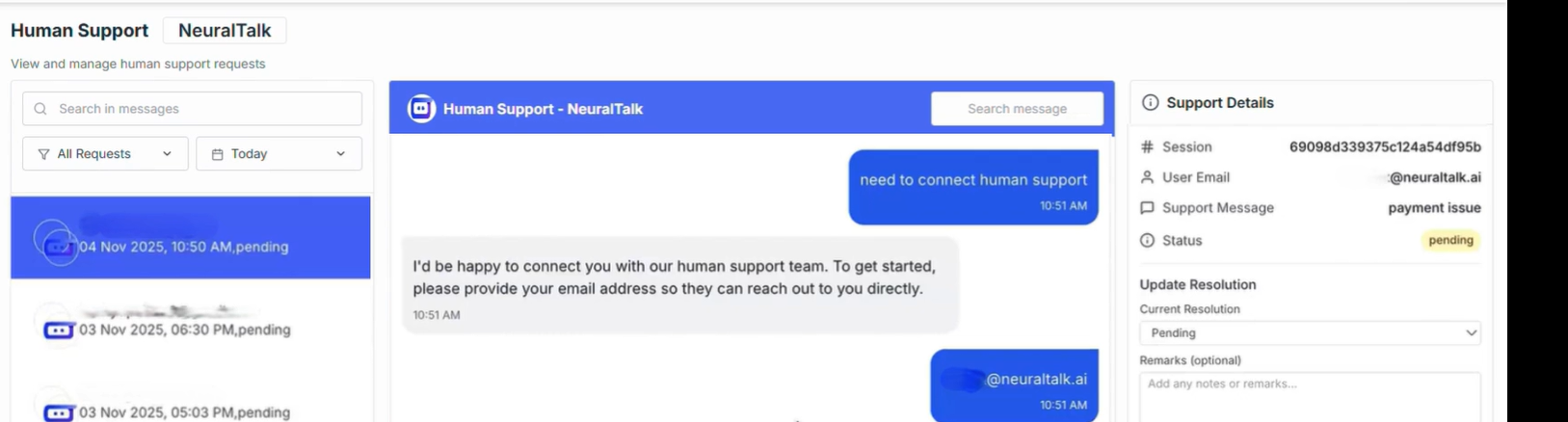
Human Support Overview
The Human Support is designed to help you quickly find and manage support requests.Search & Filters
Use the top search bar and filters to locate specific support requests.- Search in Messages: Search for keywords or phrases within support request conversations using the Search message field.
- Request Status Filters: Filter support requests by status: All Requests, Open, In Progress, Resolved, Closed
Date Range Filters
Narrow down support requests by selecting a time range.- Quick Date Filters
- Custom Range
Support Requests List
The left panel displays all support requests based on selected filters.- All Requests: Displays every human support request.
- Open: Requests that are newly created and awaiting action.
- In Progress: Requests currently being handled by a human agent.
- Resolved: Requests that have been successfully addressed.
- Closed: Requests that are completed and archived.
No human support requests found
Support Request Details
The right panel shows detailed information for the selected support request.- Conversation Messages: View the full conversation between the user, chatbot, and human agent.
- Support Details: View request-related information and current status.
When Support Requests Appear
Support requests are created when:- A user explicitly requests human assistance
- The chatbot escalates the conversation to a human agent
- Automated responses are insufficient for the user’s needs
Best Practices
- Regularly monitor open requests to reduce response time
- Use message search to quickly locate specific issues
- Update request status as it progresses
- Review resolved requests to improve chatbot training