

Overview
The Knowledge Sources feature allows you to connect external content to your chatbot so it can deliver accurate, contextual, and up-to-date responses. You can add URLs, documents, images, and third-party integrations as sources of knowledge. This guide explains how to add sources, configure recrawling, and manage indexed URLs.Accessing Knowledge Sources
1
Open Knowledge Sources
- Log in to your dashboard
- Navigate to Data Source from the main menu
- Click on Knowledge in the left sidebar
2
View Current Status
- The Knowledge page loads with Webpage sources that have been crawled and indexed for your chatbot
- If no sources are added, you’ll see No data sources found for this chatbot
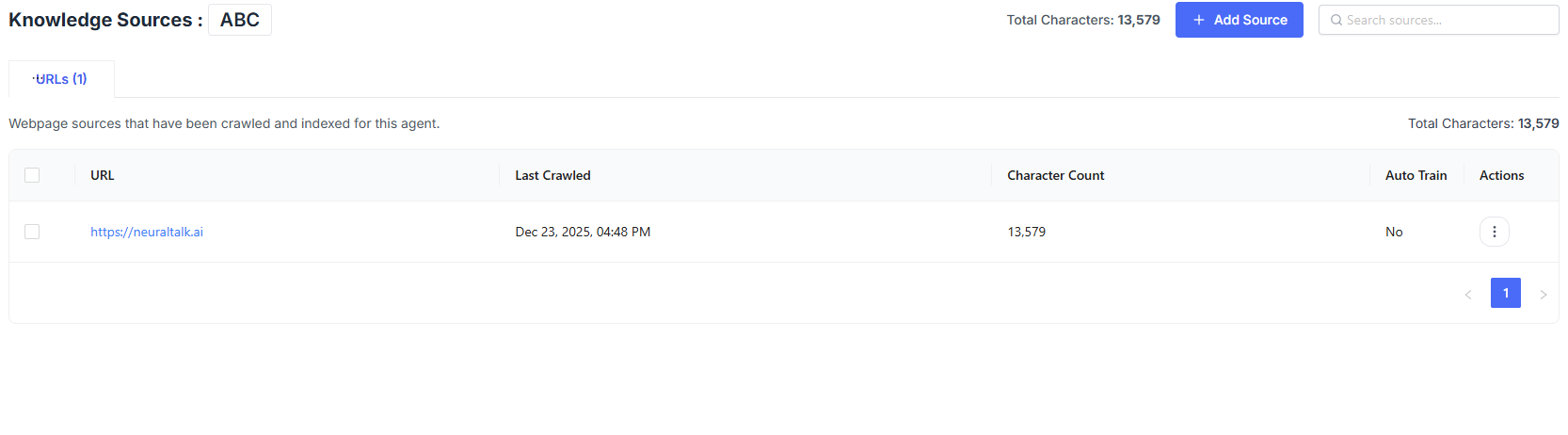
Adding a Knowledge Source
Click Add Source to begin adding content to your chatbot.URL
Add public webpages to train your chatbot using live website content.
Documents & Images
Upload PDFs, text documents, or images as knowledge sources.
Google Drive
Connect files directly from your Google Drive.
Notion
Sync selected Notion pages as structured knowledge.
URL Configuration
When adding a URL source, you must configure how content is crawled.- URL: Required
- Scope Options: This page only, Entire site, Subdirectory only, Sitemap
Auto-Recrawl Settings
Enable Automatic Recrawling
Enable Automatic Recrawling
- Keeps your sources up to date
- Sources are refreshed on a regular schedule
Why It Matters
Why It Matters
Ensures your chatbot always responds using the latest content from your website.
-
Edit: Open Edit URL Settings to manage source behavior.
- Auto-Recrawl: Enable automatic recrawling of this source on a schedule.
- Cancel: Discard changes.
- Save: Apply the updated settings.
- Recrawl: Re-index the URL to fetch the latest content.
- Delete: Remove the URL and all associated data from the chatbot.
Best Practices
- Add high-quality, relevant sources for better answers
- Enable auto-recrawl for frequently updated websites
- Remove outdated or low-value sources
- Monitor total character usage regularly