

Overview
The Design Settings feature allows you to fully customize the appearance and layout of your chatbot. Adjust colors, typography, chat window size, header design, input fields, and widget positioning to match your brand identity and provide an optimal user experience. All changes are reflected instantly in the preview. Click Save Changes in the header to save your configuration.Accessing Design Settings
1
Open the Dashboard
- Log in to your NeuralTalk AI dashboard
- Select the chatbot you want to connect
- Navigate to Addons and Design from the main menu
- Click on Design
2
Preview Design Changes
- Adjust settings and see live changes in the chat widget preview
- Once satisfied, click Save Changes to apply them
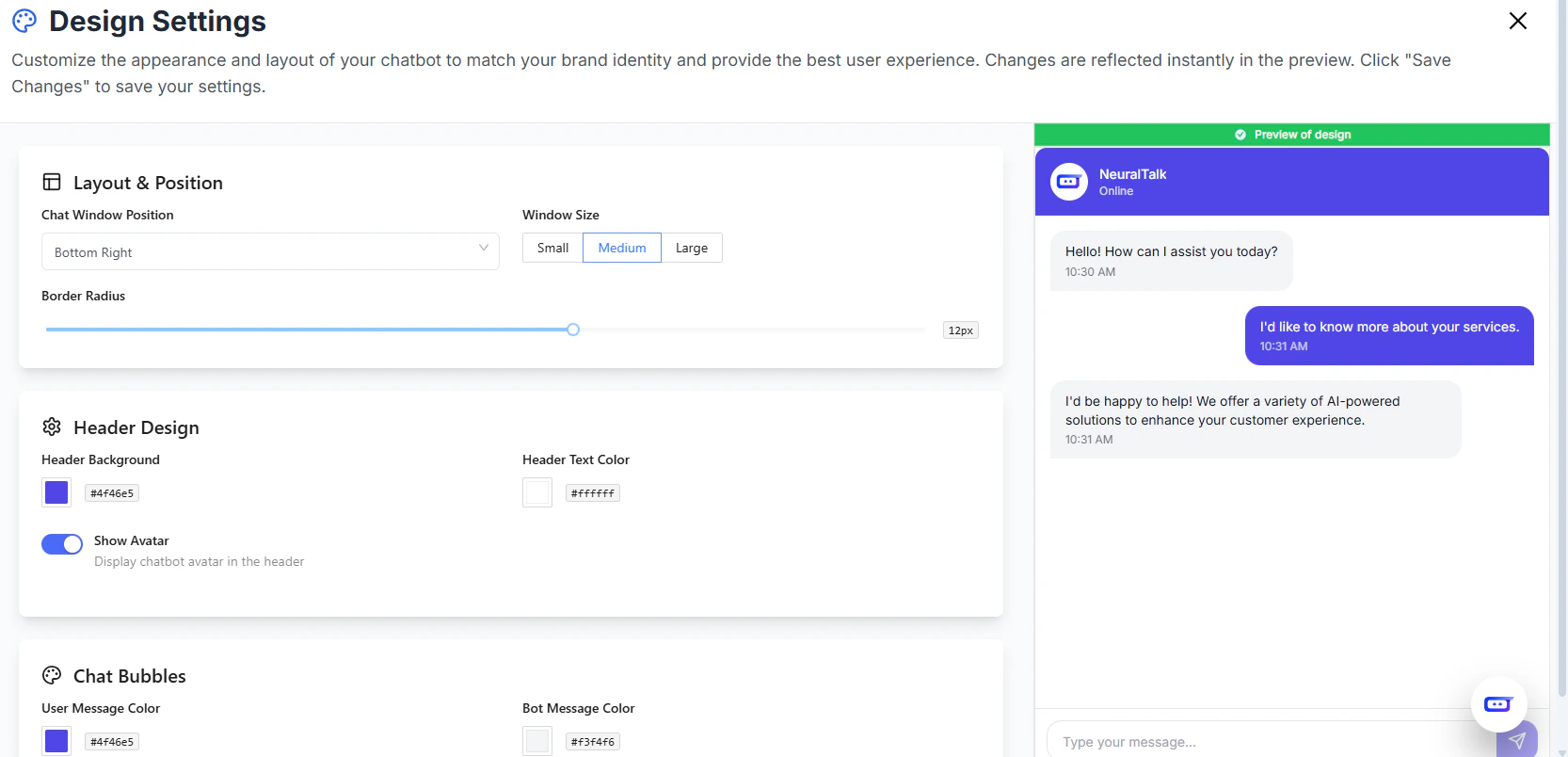
Layout & Position
- Chat Window Position: Choose where the chat appears on the page (e.g., Bottom Right)
- Window Size: Small, Medium, or Large
- Border Radius: Adjust the roundness of the chat window corners
Header Design
- Header Background Color: Customize header background
- Header Text Color: Choose header text color
- Show Avatar: Enable or disable the chatbot avatar in the header
Chat Bubbles
- User Message Color: Customize the color of user messages
- Bot Message Color: Customize the color of bot messages
- Enable Bubble Message: Show messages inside chat bubbles for better readability
Typography
- Font Family: Choose your preferred font (e.g., Inter)
- Font Size: Set font size for messages and headers
Input Field
- Background Color
- Text Color
- Border Color
- Placeholder Text: Customize placeholder message
- Send Button:
- Button Color
- Hover Color
- Disabled Color
Widget Configuration
- Widget Size: Small, Medium, or Large
- Button Size: Normal, Small, or Large
- Desktop & Mobile Offsets: Adjust spacing from page edges
- Movable Widget: Allow users to drag the widget
- Initially Open: Open chat widget by default
- Widget Logo: Show or hide branding
Bubble Preview & Greetings
- Preview Toast: Show a toast near the chat bubble after page load (per session)
- Greeting Message: Display a custom greeting (max 100 characters)
Branding
- Free plan users always show Powered by NeuralTalk
- Paid plans can choose to hide branding
Best Practices
- Use brand colors and fonts consistently for better UX
- Preview changes in multiple screen sizes (desktop & mobile)
- Keep greeting messages concise for maximum impact
- Enable bubble messages for improved readability
- Save changes regularly to avoid losing configuration