> ## Documentation Index
> Fetch the complete documentation index at: https://docs.neuraltalk.ai/llms.txt
> Use this file to discover all available pages before exploring further.
# 🎯 HubSpot Integration
> Connect your NeuralTalk AI chatbot to HubSpot CRM and automatically turn conversations into actionable leads while providing your sales team with complete conversation context for better follow-ups.
Connect your NeuralTalk AI chatbot to HubSpot CRM and automatically turn conversations into actionable leads while providing your sales team with complete conversation context for better follow-ups.
 ## Overview
The HubSpot integration enables your NeuralTalk AI chatbot to:
* 🎯 **Automatically sync chat contacts with HubSpot CRM**
* 📊 **Track customer interactions and conversation history**
* 🔄 **Create and update contact properties automatically**
* 📞 **Capture human support requests as contacts in HubSpot**
* 📈 **Streamline your sales pipeline with qualified leads**
* 💼 **Provide complete conversation context for your sales team**
## Benefits of HubSpot Integration
* ✅ **Automatic Lead Capture**: Convert chat users into HubSpot contacts with zero manual effort
* 📋 **Human Support Request Tracking**: All human support requests are automatically logged in HubSpot with conversation history
* 📄 **Detailed Conversation Context**: Chat transcripts are attached to contacts, providing full context for your sales team
* 🏷️ **Lead Status Tracking**: New contacts are marked with "NEW" lead status for easy follow-up
* 🔄 **Seamless Customer Journey**: Track the path from initial chat interaction through your sales pipeline
* 🔗 **Data Synchronization**: Real-time sync between your chatbot and HubSpot CRM
You'll need a HubSpot account to enable CRM integration with your chatbot conversations.
## Prerequisites
Before setting up your HubSpot integration, you need:
1. ✅ An active NeuralTalk AI account
2. 🤖 A created and trained chatbot on the NeuralTalk AI platform
3. 🏢 A HubSpot account (any tier - Free, Starter, Professional, or Enterprise)
4. 🔑 Admin access to your HubSpot account for authorization
## Setup Process
### Step 1: Access NeuralTalk AI Integration Settings
1. Log in to your [NeuralTalk AI dashboard](https://neuraltalk.ai)
2. Select the chatbot you want to connect to HubSpot
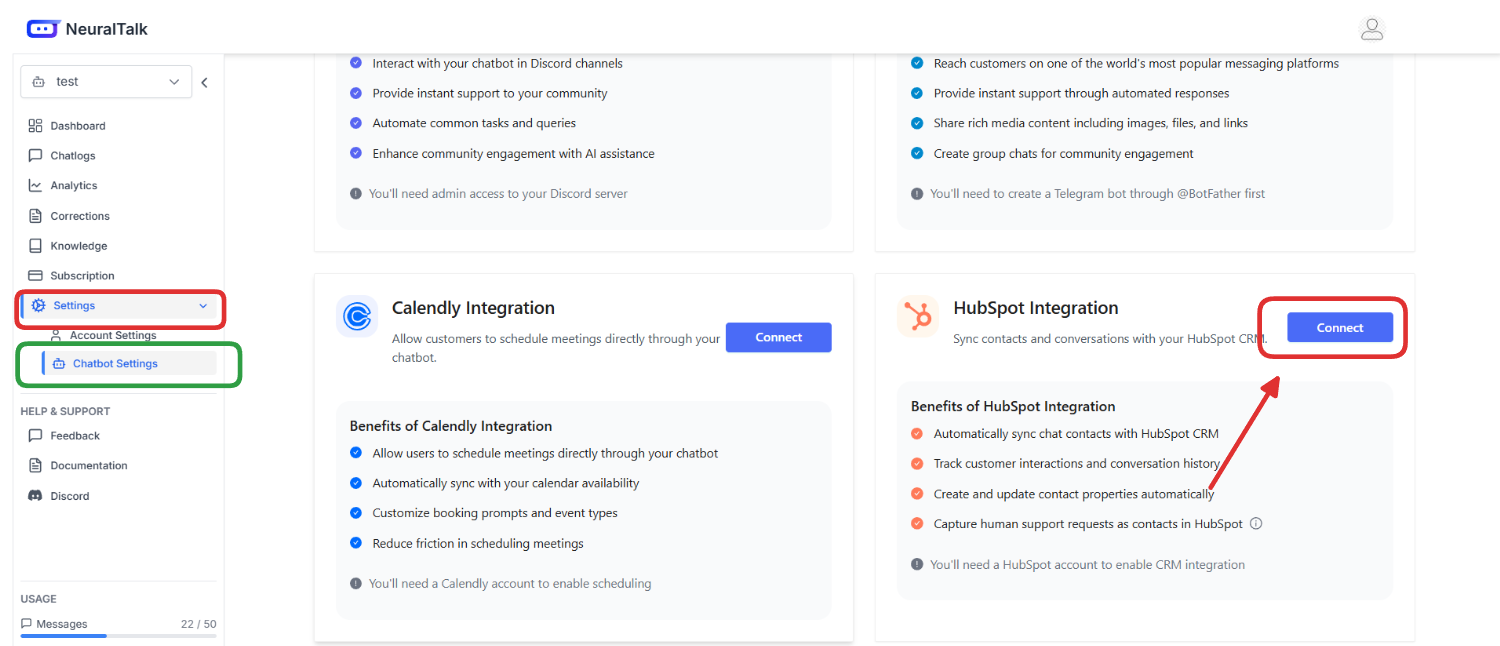
3. Navigate to **Settings** in the left sidebar
4. Click on **Chatbot Settings** from the expanded menu
5. Navigate to the **Integrations** tab at the top of the page
6. Find the **HubSpot Integration** card
7. Review the benefits of HubSpot integration:
* Automatically sync chat contacts with HubSpot CRM
* Track customer interactions and conversation history
* Create and update contact properties automatically
* Capture human support requests as contacts in HubSpot
8. Click the **Connect** button to start the integration process
### Step 2: Connect Your HubSpot Account
When you click **Connect**, you'll be redirected to the HubSpot authorization page:
## Overview
The HubSpot integration enables your NeuralTalk AI chatbot to:
* 🎯 **Automatically sync chat contacts with HubSpot CRM**
* 📊 **Track customer interactions and conversation history**
* 🔄 **Create and update contact properties automatically**
* 📞 **Capture human support requests as contacts in HubSpot**
* 📈 **Streamline your sales pipeline with qualified leads**
* 💼 **Provide complete conversation context for your sales team**
## Benefits of HubSpot Integration
* ✅ **Automatic Lead Capture**: Convert chat users into HubSpot contacts with zero manual effort
* 📋 **Human Support Request Tracking**: All human support requests are automatically logged in HubSpot with conversation history
* 📄 **Detailed Conversation Context**: Chat transcripts are attached to contacts, providing full context for your sales team
* 🏷️ **Lead Status Tracking**: New contacts are marked with "NEW" lead status for easy follow-up
* 🔄 **Seamless Customer Journey**: Track the path from initial chat interaction through your sales pipeline
* 🔗 **Data Synchronization**: Real-time sync between your chatbot and HubSpot CRM
You'll need a HubSpot account to enable CRM integration with your chatbot conversations.
## Prerequisites
Before setting up your HubSpot integration, you need:
1. ✅ An active NeuralTalk AI account
2. 🤖 A created and trained chatbot on the NeuralTalk AI platform
3. 🏢 A HubSpot account (any tier - Free, Starter, Professional, or Enterprise)
4. 🔑 Admin access to your HubSpot account for authorization
## Setup Process
### Step 1: Access NeuralTalk AI Integration Settings
1. Log in to your [NeuralTalk AI dashboard](https://neuraltalk.ai)
2. Select the chatbot you want to connect to HubSpot
3. Navigate to **Settings** in the left sidebar
4. Click on **Chatbot Settings** from the expanded menu
5. Navigate to the **Integrations** tab at the top of the page
6. Find the **HubSpot Integration** card
7. Review the benefits of HubSpot integration:
* Automatically sync chat contacts with HubSpot CRM
* Track customer interactions and conversation history
* Create and update contact properties automatically
* Capture human support requests as contacts in HubSpot
8. Click the **Connect** button to start the integration process
### Step 2: Connect Your HubSpot Account
When you click **Connect**, you'll be redirected to the HubSpot authorization page:
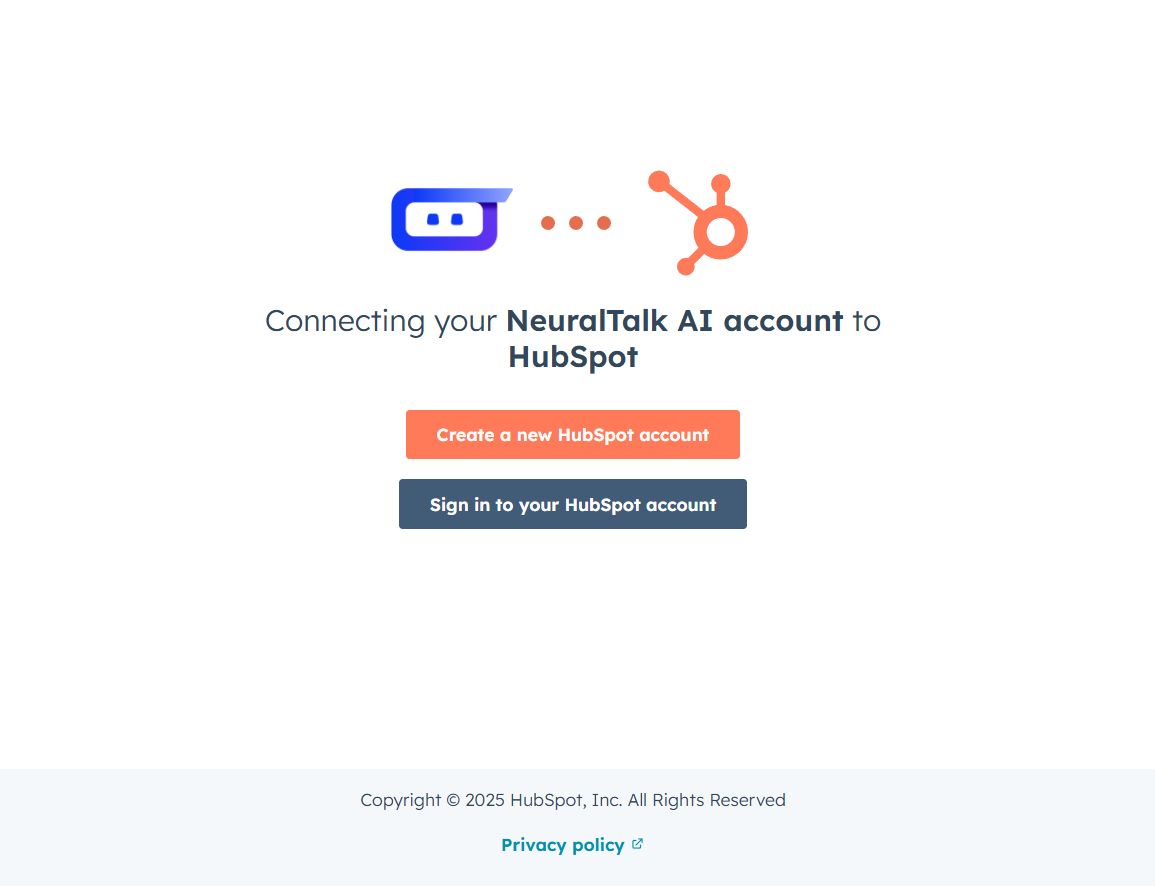 **Connecting your NeuralTalk AI account to HubSpot**
You'll see two options to proceed:
1. **Create a new HubSpot account** - If you don't have a HubSpot account yet
2. **Sign in to your HubSpot account** - If you already have an existing HubSpot account
Choose the appropriate option based on your situation. Most users will select **"Sign in to your HubSpot account"** to connect their existing CRM.
### Step 3: Choose Your HubSpot Account
After signing in, you'll see the account selection screen:
**Connecting your NeuralTalk AI account to HubSpot**
You'll see two options to proceed:
1. **Create a new HubSpot account** - If you don't have a HubSpot account yet
2. **Sign in to your HubSpot account** - If you already have an existing HubSpot account
Choose the appropriate option based on your situation. Most users will select **"Sign in to your HubSpot account"** to connect their existing CRM.
### Step 3: Choose Your HubSpot Account
After signing in, you'll see the account selection screen:
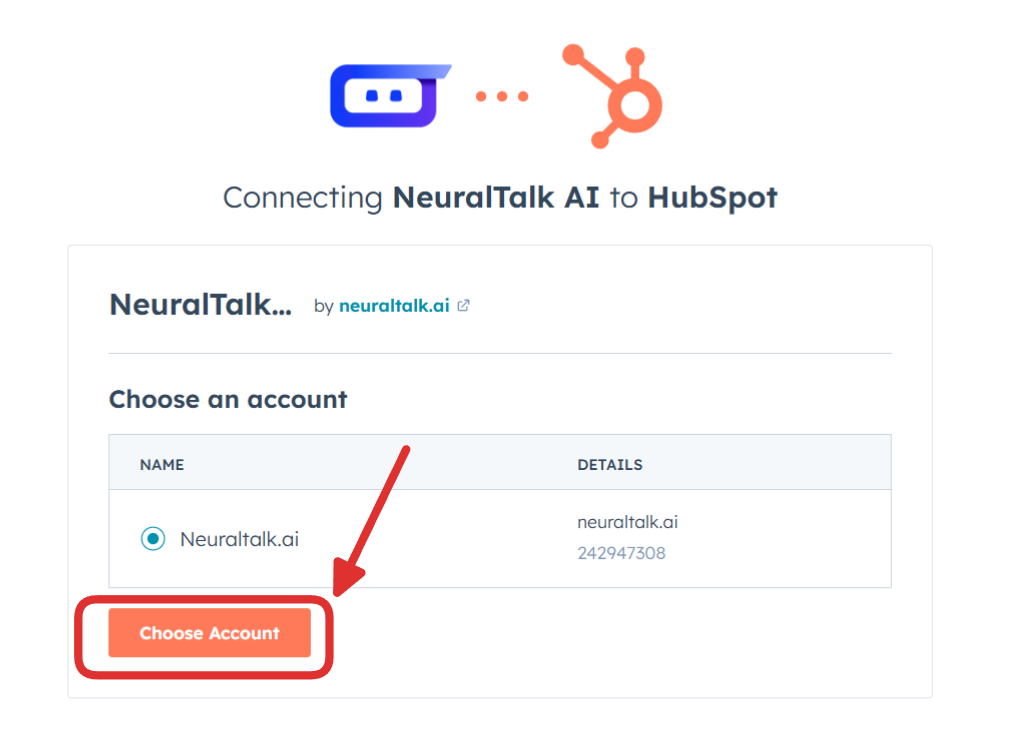 **Connecting NeuralTalk AI to HubSpot**
The integration app by **neuraltalk.ai** will display your available HubSpot accounts:
1. **Choose an account** from the list of available accounts
2. **Account Details** will show:
* **NAME**: Your HubSpot account name (e.g., NeuralTalk.ai)
* **DETAILS**: Your HubSpot domain and Portal ID
3. Select your desired account by clicking the radio button
4. Click **Choose Account** to proceed with the authorization
### Step 4: Verify Successful Connection
After successful authorization, you'll be redirected back to your NeuralTalk AI dashboard:
**Connecting NeuralTalk AI to HubSpot**
The integration app by **neuraltalk.ai** will display your available HubSpot accounts:
1. **Choose an account** from the list of available accounts
2. **Account Details** will show:
* **NAME**: Your HubSpot account name (e.g., NeuralTalk.ai)
* **DETAILS**: Your HubSpot domain and Portal ID
3. Select your desired account by clicking the radio button
4. Click **Choose Account** to proceed with the authorization
### Step 4: Verify Successful Connection
After successful authorization, you'll be redirected back to your NeuralTalk AI dashboard:
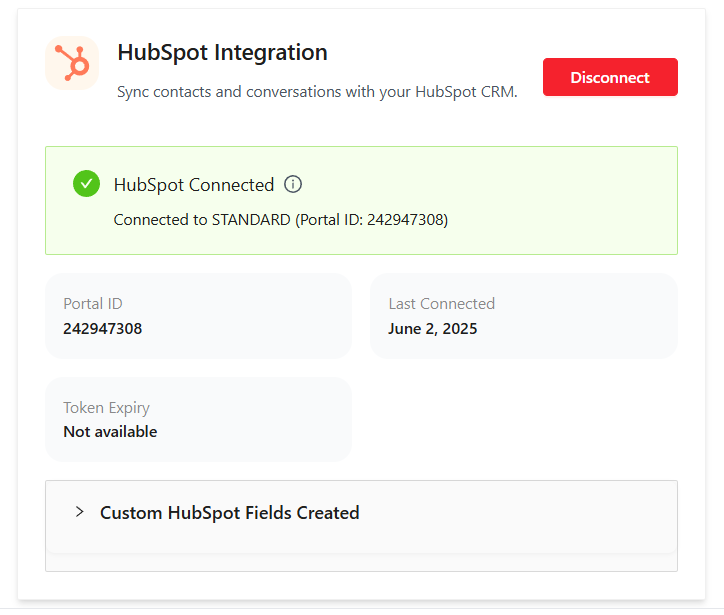 The connection status will show:
* ✅ **HubSpot Connected**
* **Connected Portal**: Your HubSpot account details
* **Portal ID**: Your unique HubSpot Portal ID (e.g., 242947308)
* **Last Connected**: Date and time of connection
* **Token Expiry**: Current status of your access token
**Additional Information Displayed**:
* **Custom HubSpot Fields Created**: Expandable section showing the custom fields that were automatically created in your HubSpot account for storing chatbot data
You'll also see a red **Disconnect** button if you need to remove the integration later.
## How It Works
Once connected, your NeuralTalk AI-HubSpot integration will:
### 🎯 **Lead Capture Process**
1. **User Interaction**: When users engage with your chatbot and provide contact information
2. **Automatic Sync**: Contact details are instantly synced to your HubSpot CRM
3. **Lead Classification**: New contacts are automatically tagged with "NEW" lead status
4. **Context Preservation**: Complete conversation history is attached to each contact
### 📞 **Human Support Workflow**
1. **Support Request**: User requests human assistance through the chatbot
2. **Contact Creation**: A new contact (or update existing) is created in HubSpot
3. **Context Transfer**: Full conversation transcript is attached as a note
4. **Follow-up Ready**: Your team has complete context for immediate follow-up
### 🔄 **Data Synchronization**
* **Real-time Updates**: Contact information syncs instantly between platforms
* **Custom Fields**: Specialized fields store chatbot-specific information
* **Activity Timeline**: All interactions are recorded in HubSpot's timeline
* **Lead Scoring**: Integrate with HubSpot's lead scoring system
## Custom Fields Created
The integration automatically creates the following custom fields in your HubSpot contacts:
| Field Name | Description | Purpose |
| -------------------------- | -------------------------------------------- | -------------------------------------- |
| `chatbot_session_id` | Unique ID of the chat session | Track individual chat sessions |
| `chatbot_source` | Name of the chatbot that generated the lead | Identify which bot created the contact |
| `last_chatbot_interaction` | Timestamp of the last interaction | Track engagement recency |
| `human_support_requested` | Whether human support was requested | Flag contacts needing follow-up |
| `human_support_message` | The support request message from the user | Context for support teams |
| `conversation_history` | Complete chat transcript | Full conversation context |
| `platform` | Platform identifier (always "NeuralTalk AI") | Source identification |
**Additional Contact Properties**:
* **Lead Status**: Automatically set to "NEW" for all chatbot-generated contacts
* **Contact Notes**: Complete conversation history attached as detailed notes
* **Source**: Tagged as originating from NeuralTalk AI chatbot
* **Activity Timeline**: All interactions logged with timestamps
## Usage Examples
### Lead Generation Scenario
**Marketing Website Lead Capture**:
```
Visitor: "I'm interested in your premium plan"
Chatbot: "I'd be happy to help! May I get your email to send you detailed information?"
Visitor: "Sure, it's john@company.com"
Result in HubSpot:
✅ Contact created: John @ company.com
✅ Lead Status: NEW
✅ Source: NeuralTalk AI Chatbot
✅ Notes: Complete conversation attached
✅ Custom Fields: All chatbot data populated
```
### Customer Support Scenario
**Human Support Request**:
```
Customer: "I need help with my billing issue"
Chatbot: "I'll connect you with our support team. Please provide your email."
Customer: "sarah@business.com - My subscription isn't showing the right features"
Result in HubSpot:
✅ Contact created/updated: Sarah @ business.com
✅ Support Message: "My subscription isn't showing the right features"
✅ Human Support Requested: True
✅ Priority: High (for immediate follow-up)
✅ Full Context: Complete conversation history
```
### Sales Qualification Scenario
**Product Demo Request**:
```
Prospect: "Can you show me how your AI chatbot works?"
Chatbot: "Absolutely! I can schedule a demo. What's your email?"
Prospect: "mike@startup.com"
Chatbot: "What's your company size?"
Prospect: "We're a 50-person startup"
Result in HubSpot:
✅ Qualified Lead: Mike @ startup.com
✅ Company Size: 50 employees
✅ Interest Level: High (demo requested)
✅ Sales Stage: Demo Requested
✅ Follow-up: Automatic task created
```
## Advanced Configuration
### HubSpot Workflow Integration
**Automatic Lead Assignment**:
1. Create HubSpot workflows triggered by "Source = NeuralTalk AI"
2. Automatically assign leads to appropriate sales reps
3. Set up email notifications for high-priority leads
4. Create tasks for immediate follow-up
**Lead Scoring Enhancement**:
1. Assign points for chatbot engagement
2. Higher scores for human support requests
3. Bonus points for detailed conversations
4. Integration with existing lead scoring models
### Custom Field Mapping
**Additional Field Customization**:
1. **Industry Detection**: Map conversation topics to industry fields
2. **Company Size**: Extract company information from conversations
3. **Pain Points**: Identify and categorize customer challenges
4. **Product Interest**: Track which products/services were discussed
### Automation Rules
**Follow-up Automation**:
1. **Immediate**: Human support requests get instant notification
2. **Same Day**: High-intent leads assigned within 2 hours
3. **Weekly**: Regular lead nurturing sequences
4. **Monthly**: Re-engagement campaigns for inactive contacts
## Monitoring & Analytics
### HubSpot CRM Integration Analytics
**Contact Creation Metrics**:
* 📊 **Daily Contacts Created**: Track new contacts from chatbot interactions
* 📈 **Conversion Rates**: Percentage of chatbot users becoming leads
* 🎯 **Lead Quality Scores**: Average lead scores for chatbot-generated contacts
* 📞 **Support Request Volume**: Number of human support escalations
**Sales Pipeline Impact**:
* 💰 **Revenue Attribution**: Track deals originating from chatbot interactions
* ⏱️ **Sales Cycle Speed**: Compare chatbot leads vs other sources
* 🏆 **Win Rates**: Success rates for chatbot-generated opportunities
* 📊 **ROI Analysis**: Return on investment for chatbot integration
### Custom Reporting
**HubSpot Dashboard Setup**:
1. **Chatbot Lead Performance**: Custom report showing all NeuralTalk AI leads
2. **Conversation Quality**: Analysis of conversation length and engagement
3. **Support Escalation Trends**: Track human support request patterns
4. **Revenue Attribution**: Connect chatbot interactions to closed deals
## Troubleshooting
### Common Issues & Solutions
**🚫 Contacts Not Syncing**
1. **Check Connection**: Verify HubSpot integration shows "Connected"
2. **Token Validation**: Ensure access token hasn't expired
3. **Permissions**: Confirm account has proper HubSpot permissions
4. **API Limits**: Check if HubSpot API limits have been reached
**📊 Missing Custom Fields**
1. **Field Creation**: Custom fields are created automatically on first use
2. **Permission Check**: Ensure integration has field creation permissions
3. **Manual Creation**: Fields can be manually created in HubSpot if needed
4. **Field Mapping**: Verify field names match expected values
**⚠️ Duplicate Contacts**
1. **Email Matching**: HubSpot uses email as primary identifier
2. **Deduplication**: Enable HubSpot's automatic deduplication rules
3. **Data Cleanup**: Use HubSpot tools to merge duplicate contacts
4. **Prevention**: Set up proper matching rules in HubSpot
**🔄 Connection Issues**
1. **Token Refresh**: Disconnect and reconnect the integration
2. **Account Access**: Verify HubSpot account is active and accessible
3. **Network Issues**: Check for connectivity problems
4. **Service Status**: Check both HubSpot and NeuralTalk AI service status
### Getting Help
If you need assistance:
1. 📖 **Documentation**: Review this guide and troubleshooting section
2. 🧪 **Test Integration**: Try creating a test contact through the chatbot
3. 📧 **Support Team**: Contact [support@neuraltalk.ai](mailto:support@neuraltalk.ai)
4. 🎯 **HubSpot Support**: For HubSpot-specific issues, contact HubSpot support
## Best Practices
### CRM Organization
* 🏷️ **Lead Tagging**: Use consistent tags for chatbot-generated leads
* 📋 **Custom Views**: Create HubSpot views specifically for chatbot contacts
* 🎯 **Lead Scoring**: Incorporate chatbot engagement into lead scoring
* 📊 **Regular Cleanup**: Maintain data quality with regular contact audits
### Sales Process Optimization
* ⚡ **Quick Follow-up**: Respond to human support requests within 1 hour
* 📝 **Context Review**: Always check conversation history before contacting leads
* 🎯 **Personalization**: Use conversation context to personalize outreach
* 📈 **Performance Tracking**: Monitor conversion rates and optimize accordingly
### Data Management
* 🔄 **Regular Sync**: Monitor sync status and resolve issues quickly
* 📊 **Quality Control**: Review and improve chatbot responses based on lead quality
* 🎯 **Segmentation**: Use chatbot data for better contact segmentation
* 📈 **Reporting**: Create regular reports on chatbot lead performance
### Team Training
* 👥 **Sales Training**: Train sales team on using chatbot context
* 📚 **CRM Usage**: Ensure team understands custom fields and their purpose
* 🎯 **Follow-up Protocols**: Establish clear procedures for chatbot leads
* 📊 **Performance Reviews**: Regular assessment of chatbot-to-sale conversion
## Security Considerations
### Data Protection
* 🔐 **Encryption**: All data transmission encrypted using industry standards
* 🛡️ **Token Security**: HubSpot access tokens securely stored and managed
* 📋 **Compliance**: GDPR, CCPA, and SOX compliance maintained
* 🔍 **Audit Logs**: Complete audit trail of all data synchronization
### Access Control
* 🔑 **Permission Management**: Integration respects HubSpot's permission model
* 👤 **User Authentication**: Secure OAuth authentication with HubSpot
* 🏢 **Account Isolation**: Complete data isolation between different accounts
* ⏰ **Token Management**: Automatic token refresh and expiration handling
### Privacy Protection
* 👁️ **Data Minimization**: Only necessary contact data is synchronized
* 🗑️ **Data Retention**: Configurable data retention policies
* 📊 **Consent Management**: Integration with HubSpot's consent management
* 🔒 **PII Protection**: Special handling of personally identifiable information
## Pricing & Limits
### HubSpot API Limits
* 📊 **Daily Limits**: Standard HubSpot API limits apply (varies by plan)
* 👥 **Contact Limits**: No additional limits beyond your HubSpot plan
* 📁 **Storage**: Contact data counts toward HubSpot storage limits
* 📈 **Scaling**: Integration scales with your HubSpot plan tier
### NeuralTalk AI Integration
* ✅ **Included**: HubSpot integration included in all paid plans
* 💬 **Contact Sync**: No additional fees for contact synchronization
* 💰 **No Hidden Costs**: No setup fees or monthly integration charges
* 📊 **Full Analytics**: Complete integration analytics included
## Disconnecting Your Integration
To disconnect your HubSpot integration:
### From NeuralTalk AI Dashboard
1. **Navigate**: Go to **Settings > Chatbot Settings > Integrations**
2. **Find HubSpot**: Locate the HubSpot integration card
3. **Disconnect**: Click the red **Disconnect** button
4. **Confirm**: Confirm the disconnection when prompted
### What Happens When You Disconnect
* ✋ **Stops Syncing**: New chatbot interactions won't sync to HubSpot
* 📊 **Data Retained**: Existing contacts and data remain in HubSpot
* 🔄 **Reconnection**: You can reconnect anytime with the same account
* 🏷️ **Field Preservation**: Custom fields remain in your HubSpot account
### Data Cleanup (Optional)
If you want to remove chatbot-related data from HubSpot:
1. **Export Data**: Export chatbot contacts for backup
2. **Remove Contacts**: Delete contacts created by NeuralTalk AI (optional)
3. **Custom Fields**: Remove custom fields if no longer needed
4. **Workflows**: Update any workflows that reference NeuralTalk AI data
Disconnecting the integration doesn't automatically remove data from HubSpot. This gives you flexibility to reconnect without losing historical data.
## Use Cases by Industry
### **SaaS Companies**
* **Lead Qualification**: Pre-qualify leads before sales calls
* **Product Demos**: Capture demo requests with context
* **Feature Requests**: Track product feedback in CRM
* **Churn Prevention**: Identify at-risk customers early
### **E-commerce**
* **Customer Support**: Escalate complex issues with full context
* **Product Inquiries**: Capture interest in specific products
* **Return Requests**: Process returns with conversation history
* **Upsell Opportunities**: Identify expansion opportunities
### **Professional Services**
* **Consultation Requests**: Capture leads with specific needs
* **Project Inquiries**: Track potential projects and requirements
* **Client Onboarding**: Streamline new client intake process
* **Expertise Matching**: Connect clients with right specialists
### **Healthcare**
* **Appointment Scheduling**: Capture appointment requests
* **Insurance Verification**: Collect insurance information
* **Symptom Tracking**: Record patient concerns and symptoms
* **Follow-up Care**: Coordinate post-treatment communication
## Next Steps
After successful integration:
1. **🧪 Test the Integration**:
* Create test contacts through your chatbot
* Verify data appears correctly in HubSpot
* Test human support request workflow
* Check custom field population
2. **📊 Set Up HubSpot Workflows**:
* Create automated lead assignment rules
* Set up notification workflows for support requests
* Configure lead scoring for chatbot interactions
* Establish follow-up task automation
3. **👥 Train Your Team**:
* Educate sales team on chatbot lead context
* Establish follow-up procedures for different lead types
* Create guidelines for using conversation history
* Set up performance tracking and KPIs
4. **📈 Optimize Performance**:
* Monitor lead quality and conversion rates
* Analyze conversation patterns for improvements
* Adjust chatbot responses based on HubSpot data
* Continuously refine lead qualification process
5. **🔄 Scale Your Process**:
* Expand chatbot to more pages/channels
* Integrate additional HubSpot features
* Consider advanced automation opportunities
* Explore other NeuralTalk AI integrations
## Need Help?
For additional support with your HubSpot integration:
* 📧 **Email Support**: [support@neuraltalk.ai](mailto:support@neuraltalk.ai)
* 📖 **Documentation**: [neuraltalk.ai](https://neuraltalk.ai)
* 💬 **Community Discord**: Join our [Discord](https://discord.gg/tHpggadDAk) for peer support and tips
* 🎥 **Video Tutorials**: Check our YouTube channel for setup guides
* 🏢 **HubSpot Support**: [HubSpot's help documentation](https://knowledge.hubspot.com/) for CRM-specific questions
* 📚 **API Documentation**: [HubSpot API docs](https://developers.hubspot.com/) for advanced customization
***
*Ready to connect your HubSpot CRM? Click the **Connect** button in your NeuralTalk AI dashboard to get started and begin turning conversations into qualified leads!*
The connection status will show:
* ✅ **HubSpot Connected**
* **Connected Portal**: Your HubSpot account details
* **Portal ID**: Your unique HubSpot Portal ID (e.g., 242947308)
* **Last Connected**: Date and time of connection
* **Token Expiry**: Current status of your access token
**Additional Information Displayed**:
* **Custom HubSpot Fields Created**: Expandable section showing the custom fields that were automatically created in your HubSpot account for storing chatbot data
You'll also see a red **Disconnect** button if you need to remove the integration later.
## How It Works
Once connected, your NeuralTalk AI-HubSpot integration will:
### 🎯 **Lead Capture Process**
1. **User Interaction**: When users engage with your chatbot and provide contact information
2. **Automatic Sync**: Contact details are instantly synced to your HubSpot CRM
3. **Lead Classification**: New contacts are automatically tagged with "NEW" lead status
4. **Context Preservation**: Complete conversation history is attached to each contact
### 📞 **Human Support Workflow**
1. **Support Request**: User requests human assistance through the chatbot
2. **Contact Creation**: A new contact (or update existing) is created in HubSpot
3. **Context Transfer**: Full conversation transcript is attached as a note
4. **Follow-up Ready**: Your team has complete context for immediate follow-up
### 🔄 **Data Synchronization**
* **Real-time Updates**: Contact information syncs instantly between platforms
* **Custom Fields**: Specialized fields store chatbot-specific information
* **Activity Timeline**: All interactions are recorded in HubSpot's timeline
* **Lead Scoring**: Integrate with HubSpot's lead scoring system
## Custom Fields Created
The integration automatically creates the following custom fields in your HubSpot contacts:
| Field Name | Description | Purpose |
| -------------------------- | -------------------------------------------- | -------------------------------------- |
| `chatbot_session_id` | Unique ID of the chat session | Track individual chat sessions |
| `chatbot_source` | Name of the chatbot that generated the lead | Identify which bot created the contact |
| `last_chatbot_interaction` | Timestamp of the last interaction | Track engagement recency |
| `human_support_requested` | Whether human support was requested | Flag contacts needing follow-up |
| `human_support_message` | The support request message from the user | Context for support teams |
| `conversation_history` | Complete chat transcript | Full conversation context |
| `platform` | Platform identifier (always "NeuralTalk AI") | Source identification |
**Additional Contact Properties**:
* **Lead Status**: Automatically set to "NEW" for all chatbot-generated contacts
* **Contact Notes**: Complete conversation history attached as detailed notes
* **Source**: Tagged as originating from NeuralTalk AI chatbot
* **Activity Timeline**: All interactions logged with timestamps
## Usage Examples
### Lead Generation Scenario
**Marketing Website Lead Capture**:
```
Visitor: "I'm interested in your premium plan"
Chatbot: "I'd be happy to help! May I get your email to send you detailed information?"
Visitor: "Sure, it's john@company.com"
Result in HubSpot:
✅ Contact created: John @ company.com
✅ Lead Status: NEW
✅ Source: NeuralTalk AI Chatbot
✅ Notes: Complete conversation attached
✅ Custom Fields: All chatbot data populated
```
### Customer Support Scenario
**Human Support Request**:
```
Customer: "I need help with my billing issue"
Chatbot: "I'll connect you with our support team. Please provide your email."
Customer: "sarah@business.com - My subscription isn't showing the right features"
Result in HubSpot:
✅ Contact created/updated: Sarah @ business.com
✅ Support Message: "My subscription isn't showing the right features"
✅ Human Support Requested: True
✅ Priority: High (for immediate follow-up)
✅ Full Context: Complete conversation history
```
### Sales Qualification Scenario
**Product Demo Request**:
```
Prospect: "Can you show me how your AI chatbot works?"
Chatbot: "Absolutely! I can schedule a demo. What's your email?"
Prospect: "mike@startup.com"
Chatbot: "What's your company size?"
Prospect: "We're a 50-person startup"
Result in HubSpot:
✅ Qualified Lead: Mike @ startup.com
✅ Company Size: 50 employees
✅ Interest Level: High (demo requested)
✅ Sales Stage: Demo Requested
✅ Follow-up: Automatic task created
```
## Advanced Configuration
### HubSpot Workflow Integration
**Automatic Lead Assignment**:
1. Create HubSpot workflows triggered by "Source = NeuralTalk AI"
2. Automatically assign leads to appropriate sales reps
3. Set up email notifications for high-priority leads
4. Create tasks for immediate follow-up
**Lead Scoring Enhancement**:
1. Assign points for chatbot engagement
2. Higher scores for human support requests
3. Bonus points for detailed conversations
4. Integration with existing lead scoring models
### Custom Field Mapping
**Additional Field Customization**:
1. **Industry Detection**: Map conversation topics to industry fields
2. **Company Size**: Extract company information from conversations
3. **Pain Points**: Identify and categorize customer challenges
4. **Product Interest**: Track which products/services were discussed
### Automation Rules
**Follow-up Automation**:
1. **Immediate**: Human support requests get instant notification
2. **Same Day**: High-intent leads assigned within 2 hours
3. **Weekly**: Regular lead nurturing sequences
4. **Monthly**: Re-engagement campaigns for inactive contacts
## Monitoring & Analytics
### HubSpot CRM Integration Analytics
**Contact Creation Metrics**:
* 📊 **Daily Contacts Created**: Track new contacts from chatbot interactions
* 📈 **Conversion Rates**: Percentage of chatbot users becoming leads
* 🎯 **Lead Quality Scores**: Average lead scores for chatbot-generated contacts
* 📞 **Support Request Volume**: Number of human support escalations
**Sales Pipeline Impact**:
* 💰 **Revenue Attribution**: Track deals originating from chatbot interactions
* ⏱️ **Sales Cycle Speed**: Compare chatbot leads vs other sources
* 🏆 **Win Rates**: Success rates for chatbot-generated opportunities
* 📊 **ROI Analysis**: Return on investment for chatbot integration
### Custom Reporting
**HubSpot Dashboard Setup**:
1. **Chatbot Lead Performance**: Custom report showing all NeuralTalk AI leads
2. **Conversation Quality**: Analysis of conversation length and engagement
3. **Support Escalation Trends**: Track human support request patterns
4. **Revenue Attribution**: Connect chatbot interactions to closed deals
## Troubleshooting
### Common Issues & Solutions
**🚫 Contacts Not Syncing**
1. **Check Connection**: Verify HubSpot integration shows "Connected"
2. **Token Validation**: Ensure access token hasn't expired
3. **Permissions**: Confirm account has proper HubSpot permissions
4. **API Limits**: Check if HubSpot API limits have been reached
**📊 Missing Custom Fields**
1. **Field Creation**: Custom fields are created automatically on first use
2. **Permission Check**: Ensure integration has field creation permissions
3. **Manual Creation**: Fields can be manually created in HubSpot if needed
4. **Field Mapping**: Verify field names match expected values
**⚠️ Duplicate Contacts**
1. **Email Matching**: HubSpot uses email as primary identifier
2. **Deduplication**: Enable HubSpot's automatic deduplication rules
3. **Data Cleanup**: Use HubSpot tools to merge duplicate contacts
4. **Prevention**: Set up proper matching rules in HubSpot
**🔄 Connection Issues**
1. **Token Refresh**: Disconnect and reconnect the integration
2. **Account Access**: Verify HubSpot account is active and accessible
3. **Network Issues**: Check for connectivity problems
4. **Service Status**: Check both HubSpot and NeuralTalk AI service status
### Getting Help
If you need assistance:
1. 📖 **Documentation**: Review this guide and troubleshooting section
2. 🧪 **Test Integration**: Try creating a test contact through the chatbot
3. 📧 **Support Team**: Contact [support@neuraltalk.ai](mailto:support@neuraltalk.ai)
4. 🎯 **HubSpot Support**: For HubSpot-specific issues, contact HubSpot support
## Best Practices
### CRM Organization
* 🏷️ **Lead Tagging**: Use consistent tags for chatbot-generated leads
* 📋 **Custom Views**: Create HubSpot views specifically for chatbot contacts
* 🎯 **Lead Scoring**: Incorporate chatbot engagement into lead scoring
* 📊 **Regular Cleanup**: Maintain data quality with regular contact audits
### Sales Process Optimization
* ⚡ **Quick Follow-up**: Respond to human support requests within 1 hour
* 📝 **Context Review**: Always check conversation history before contacting leads
* 🎯 **Personalization**: Use conversation context to personalize outreach
* 📈 **Performance Tracking**: Monitor conversion rates and optimize accordingly
### Data Management
* 🔄 **Regular Sync**: Monitor sync status and resolve issues quickly
* 📊 **Quality Control**: Review and improve chatbot responses based on lead quality
* 🎯 **Segmentation**: Use chatbot data for better contact segmentation
* 📈 **Reporting**: Create regular reports on chatbot lead performance
### Team Training
* 👥 **Sales Training**: Train sales team on using chatbot context
* 📚 **CRM Usage**: Ensure team understands custom fields and their purpose
* 🎯 **Follow-up Protocols**: Establish clear procedures for chatbot leads
* 📊 **Performance Reviews**: Regular assessment of chatbot-to-sale conversion
## Security Considerations
### Data Protection
* 🔐 **Encryption**: All data transmission encrypted using industry standards
* 🛡️ **Token Security**: HubSpot access tokens securely stored and managed
* 📋 **Compliance**: GDPR, CCPA, and SOX compliance maintained
* 🔍 **Audit Logs**: Complete audit trail of all data synchronization
### Access Control
* 🔑 **Permission Management**: Integration respects HubSpot's permission model
* 👤 **User Authentication**: Secure OAuth authentication with HubSpot
* 🏢 **Account Isolation**: Complete data isolation between different accounts
* ⏰ **Token Management**: Automatic token refresh and expiration handling
### Privacy Protection
* 👁️ **Data Minimization**: Only necessary contact data is synchronized
* 🗑️ **Data Retention**: Configurable data retention policies
* 📊 **Consent Management**: Integration with HubSpot's consent management
* 🔒 **PII Protection**: Special handling of personally identifiable information
## Pricing & Limits
### HubSpot API Limits
* 📊 **Daily Limits**: Standard HubSpot API limits apply (varies by plan)
* 👥 **Contact Limits**: No additional limits beyond your HubSpot plan
* 📁 **Storage**: Contact data counts toward HubSpot storage limits
* 📈 **Scaling**: Integration scales with your HubSpot plan tier
### NeuralTalk AI Integration
* ✅ **Included**: HubSpot integration included in all paid plans
* 💬 **Contact Sync**: No additional fees for contact synchronization
* 💰 **No Hidden Costs**: No setup fees or monthly integration charges
* 📊 **Full Analytics**: Complete integration analytics included
## Disconnecting Your Integration
To disconnect your HubSpot integration:
### From NeuralTalk AI Dashboard
1. **Navigate**: Go to **Settings > Chatbot Settings > Integrations**
2. **Find HubSpot**: Locate the HubSpot integration card
3. **Disconnect**: Click the red **Disconnect** button
4. **Confirm**: Confirm the disconnection when prompted
### What Happens When You Disconnect
* ✋ **Stops Syncing**: New chatbot interactions won't sync to HubSpot
* 📊 **Data Retained**: Existing contacts and data remain in HubSpot
* 🔄 **Reconnection**: You can reconnect anytime with the same account
* 🏷️ **Field Preservation**: Custom fields remain in your HubSpot account
### Data Cleanup (Optional)
If you want to remove chatbot-related data from HubSpot:
1. **Export Data**: Export chatbot contacts for backup
2. **Remove Contacts**: Delete contacts created by NeuralTalk AI (optional)
3. **Custom Fields**: Remove custom fields if no longer needed
4. **Workflows**: Update any workflows that reference NeuralTalk AI data
Disconnecting the integration doesn't automatically remove data from HubSpot. This gives you flexibility to reconnect without losing historical data.
## Use Cases by Industry
### **SaaS Companies**
* **Lead Qualification**: Pre-qualify leads before sales calls
* **Product Demos**: Capture demo requests with context
* **Feature Requests**: Track product feedback in CRM
* **Churn Prevention**: Identify at-risk customers early
### **E-commerce**
* **Customer Support**: Escalate complex issues with full context
* **Product Inquiries**: Capture interest in specific products
* **Return Requests**: Process returns with conversation history
* **Upsell Opportunities**: Identify expansion opportunities
### **Professional Services**
* **Consultation Requests**: Capture leads with specific needs
* **Project Inquiries**: Track potential projects and requirements
* **Client Onboarding**: Streamline new client intake process
* **Expertise Matching**: Connect clients with right specialists
### **Healthcare**
* **Appointment Scheduling**: Capture appointment requests
* **Insurance Verification**: Collect insurance information
* **Symptom Tracking**: Record patient concerns and symptoms
* **Follow-up Care**: Coordinate post-treatment communication
## Next Steps
After successful integration:
1. **🧪 Test the Integration**:
* Create test contacts through your chatbot
* Verify data appears correctly in HubSpot
* Test human support request workflow
* Check custom field population
2. **📊 Set Up HubSpot Workflows**:
* Create automated lead assignment rules
* Set up notification workflows for support requests
* Configure lead scoring for chatbot interactions
* Establish follow-up task automation
3. **👥 Train Your Team**:
* Educate sales team on chatbot lead context
* Establish follow-up procedures for different lead types
* Create guidelines for using conversation history
* Set up performance tracking and KPIs
4. **📈 Optimize Performance**:
* Monitor lead quality and conversion rates
* Analyze conversation patterns for improvements
* Adjust chatbot responses based on HubSpot data
* Continuously refine lead qualification process
5. **🔄 Scale Your Process**:
* Expand chatbot to more pages/channels
* Integrate additional HubSpot features
* Consider advanced automation opportunities
* Explore other NeuralTalk AI integrations
## Need Help?
For additional support with your HubSpot integration:
* 📧 **Email Support**: [support@neuraltalk.ai](mailto:support@neuraltalk.ai)
* 📖 **Documentation**: [neuraltalk.ai](https://neuraltalk.ai)
* 💬 **Community Discord**: Join our [Discord](https://discord.gg/tHpggadDAk) for peer support and tips
* 🎥 **Video Tutorials**: Check our YouTube channel for setup guides
* 🏢 **HubSpot Support**: [HubSpot's help documentation](https://knowledge.hubspot.com/) for CRM-specific questions
* 📚 **API Documentation**: [HubSpot API docs](https://developers.hubspot.com/) for advanced customization
***
*Ready to connect your HubSpot CRM? Click the **Connect** button in your NeuralTalk AI dashboard to get started and begin turning conversations into qualified leads!*